
All standard webinar features and …

That is all built-in WebinarIgnition
Skip external SAAS tools – start with all-in-one webinar automation system for WP

Collect leads
Inside mails
Social opt-in
CSV Import
READ MORE BELOW

Notify leads
Via email
Calendar
Social media
READ MORE BELOW

Interact & sell
Surveys, forms
Appointments
Checkouts
READ MORE BELOW
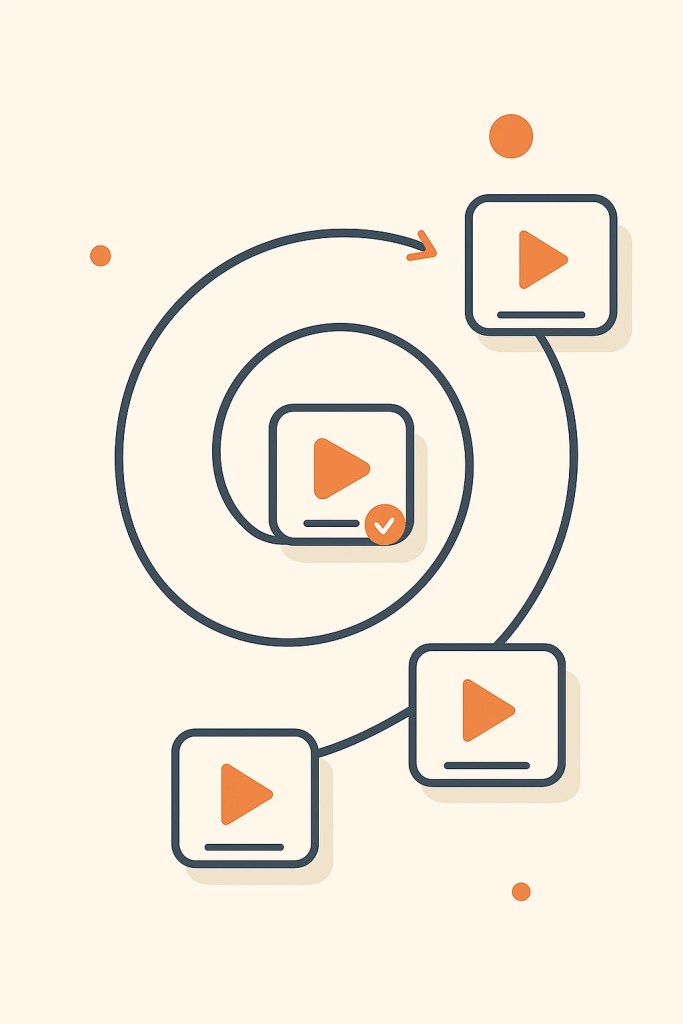
Next step mid‑webinar
Next webinar
Recurring webinar
Conditional step
READ MORE BELOW
Collect leads
When your webinar registration is the lead magnet, people don’t just “sign up for a list” – they step into a concrete promise with a date and time.
Mails, social sign‑ups and imports all flow into one place, so every new contact lands directly inside a ready‑to‑run webinar funnel on your own WordPress site.
Notify leads
After registration, WebinarIgnition quietly keeps the connection alive for you: confirmation, 1‑day reminder, 1‑hour reminder, “we’re live now” and follow‑up – all scheduled once, all fully editable.
Each email can include an ICS file and Google Calendar link, so your attendees drop the session into their calendar with a single click and simply show up when it’s time.
Interact/sell
Inside the webinar room, everything happens in one focused place: chat, questions, polls, forms, bookings, checkouts and upsells – without sending people away to another tab or page.
Timed CTAs appear exactly when your story is ready for them, turning attention into action while your visitors are still fully with you.
Next mid‑webinar
While your webinar runs, you can gently open the next door: invite to a second webinar, offer a recurring live Q&A slot, or show a conditional next step based on how engaged someone is.
Your attendees never feel pushed – they just see a logical “what happens now?” button at the moment they’re most interested.
Live & evergreen – without SaaS limits
For Zoom & WebinarJam users who are tired of attendee tiers, time limits and delays.
- Live webinars: Up to 20,000 viewers, unlimited session length, no attendee tiers.
- Evergreen webinars: Automated 24/7, same actions as live, limits only from hosting—not from WebinarIgnition.
- No platform lock‑in: Move away from typical 10–60+ second live delays on generic streaming platforms and keep everything inside your WordPress webinar room.
- Blue Ocean: Unlike Zoom’s fixed features or WebinarJam’s $500-2,000/year tiered pricing, combine any WordPress plugin (WooCommerce, forms, LMS, chat) as in-webinar actions—no SaaS limits.

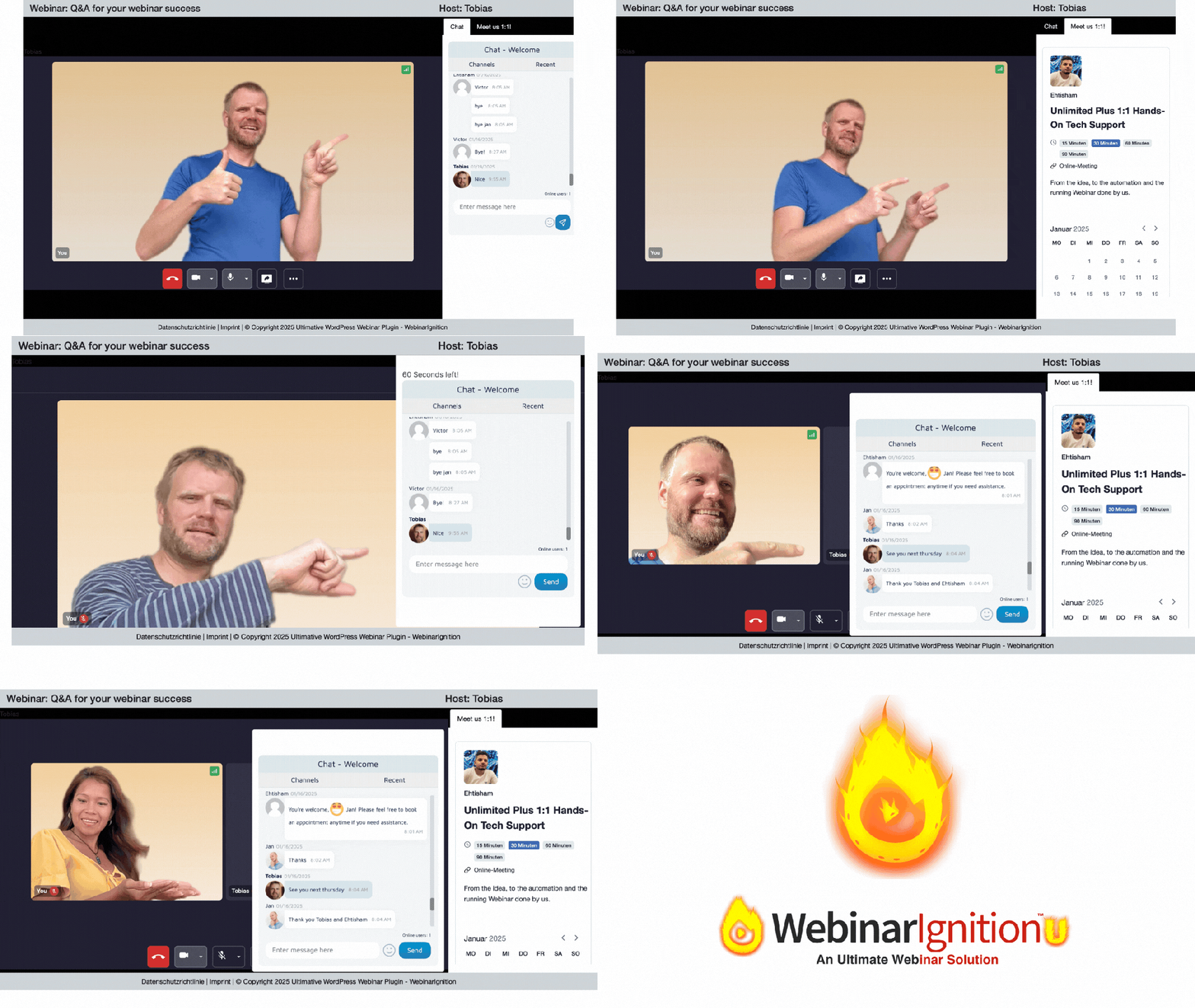
Live streaming & meetings – seamlessly integrated
Since August 2025: 100ms Live Video Infrastructure fully integrated – powering meetings, webinars and live streaming with enterprise-grade reliability, ultra-low latency (<1s), and pay-as-you-grow pricing.
Why stream inside the webinar room?
- Secure lead collection: every viewer registers first – you own the email list, not YouTube or Facebook.
- Unlimited actions during the stream: polls, CTAs, checkouts, booking forms, chat – all inside the same room without attendees leaving.
- Ultra‑low delay: 100ms latency means questions get answered in real‑time, not 10–60 seconds later like on generic streaming platforms.
100ms is pay‑as‑you‑go:
Every 100ms account includes 10,000 free minutes per month for conferencing and streaming combined, plus 300 free recording minutes, independent of your WebinarIgnition license. Direct 100ms integration inside WebinarIgnition is available on the Unlimited Plus and Unlimited Plus VIP plans only.
After those free minutes, you only pay for what you use – $0.004 per participant/minute for meetings, $0.0012 per viewer/minute for streaming. No monthly tiers, no attendee caps, no fixed fees.
Service | Type | Participants / Viewers | Cost | Delay |
|---|---|---|---|---|
Jitsi‑Meet | Meet | ~25 | Free (self‑host) | Instant |
Zoom | Meet | 100 (free) / 500+ (paid) | $16+/user/month | Instant |
100ms Meet | Meet | ~300 | $0.004/participant/min | Instant |
YouTube / Facebook Live | Stream | Unlimited | Free (with ads/branding) | 5–30 seconds |
100ms Streaming | Stream | Up to 20,000 | $0.0012/viewer/min | Minimal (<1s) |
Example: 60‑minute live webinar with 100 active participants after your free 10,000 minutes = 6,000 paid minutes × $0.004 = $24 for that session. No fixed monthly tier, no attendee caps – you only pay when you stream.
Blue Ocean: WordPress‑native live streaming
- No need for attendees to install Zoom, create a Facebook account or understand OBS/RTMP setups.
- Stream goes directly into your WordPress webinar room with shortcodes – same design, same branding, same interaction layer.
- High usage & peak traffic possible without fixed SaaS tiers or “close on limit” errors – pay‑per‑use scales smoothly.
- Optional unlimited‑visitors hosting from around $25/month (WordPress.com or similar) handles the front‑end traffic spikes.
Since version 4.04.0 (August 2025): 100ms is fully integrated – set API key, go live.
100ms Details & Pricing Transparency
100ms is pay‑as‑you‑go: all plans include 10,000 free minutes per month for conferencing and streaming combined, plus 300 free minutes for recording. After those free minutes, you only pay for what you use – no monthly tiers, no attendee caps, no fixed fees.
Core pricing (always active)
- Conferencing (meetings): $0.004 per participant/minute after 10,000 free minutes
- Streaming (viewers): $0.0012 per viewer/minute after 10,000 free minutes
Optional add-ons (only if you enable them)
- Recording: 300 free minutes/month, then $0.0135 per minute (SD) or $0.027 per minute (HD) – only charged if you record sessions
- Noise cancellation (powered by Krisp.ai): Free up to 299 minutes/month, then tiered monthly subscription:
- 300–49,999 min/month: $100/month
- 50,000–499,999 min/month: $300/month
- 500,000+ min/month: $2,000/month
Important: Recording and noise cancellation are opt‑in features – if you don’t enable them, you won’t see those charges. Your base cost remains conferencing + streaming usage only.
Real-world example
Scenario: 60‑minute live webinar (Meeting) with 100 active participants, after your 10,000 free minutes are used.
- Without recording: 6,000 paid minutes × $0.004 = $24
- With SD recording: 6,000 paid minutes × $0.004 (meeting) + 6,000 min × $0.0135 (recording) = $24 + $81 = $105 total
- With noise cancellation: If you use it sparingly (<299 min/month), free. Above that, $100/month subscription kicks in – but only if you’ve enabled the feature.
→ No recording, no noise cancellation? You pay only $24 for that 100‑person, 1‑hour session. No surprise monthly fees, no hidden add‑ons.
Different streaming: You can integrate GoBrunch with this tutorial. Completely different, customisable, social video layout.
Evergreen webinars that feel live
Turn one good live webinar into an automated funnel that keeps working for you – with the same room, the same actions and your own WordPress stack.
Smart evergreen timing
- Run once at a specific date, after a delay of X days or as recurring sessions 3–4 times per week for best results.
- Offer an instant session on top of your recurring times, so visitors can “join now” without waiting.
- Each webinar can have its own language, timezone and date/time format – ideal for global audiences.
Interactions on autopilot
- Use the same polls, CTAs, checkouts and booking forms as in your live webinars – only triggered by video time instead of a live click.
- Send registration, attendance and purchase data via webhooks into your CRM or email tool for “watched but did not buy” follow‑ups.
- Hint: record your live webinar (including the on‑screen interactions) and simply mirror that flow in your evergreen.
Blue Ocean evergreen (WordPress only)
- No separate “evergreen product” with reduced features – live and evergreen share the same engine and unlimited actions.
- Add any WordPress plugin into your evergreen room (WooCommerce, LMS, membership, form, chat) instead of being locked into fixed SaaS widgets.
- No artificial caps from the plugin on number of evergreen webinars, duration or funnels – your limits come from hosting/streaming, not from WebinarIgnition.
Result: one well‑designed webinar can keep teaching, segmenting and selling for you – in any language and time zone, directly inside WordPress.
AI Webinar Content Generator
Launch full webinar funnels in any language with one simple wizard.
- Describe your webinar once with title, audience, and goal.
- Instantly get 3 conversion‑ready registration pages, prefilled with your details.
- Receive 4 high‑converting reminder emails, auto‑generated in English, Spanish, or any other language your audience needs.
- More AI content coming soon.
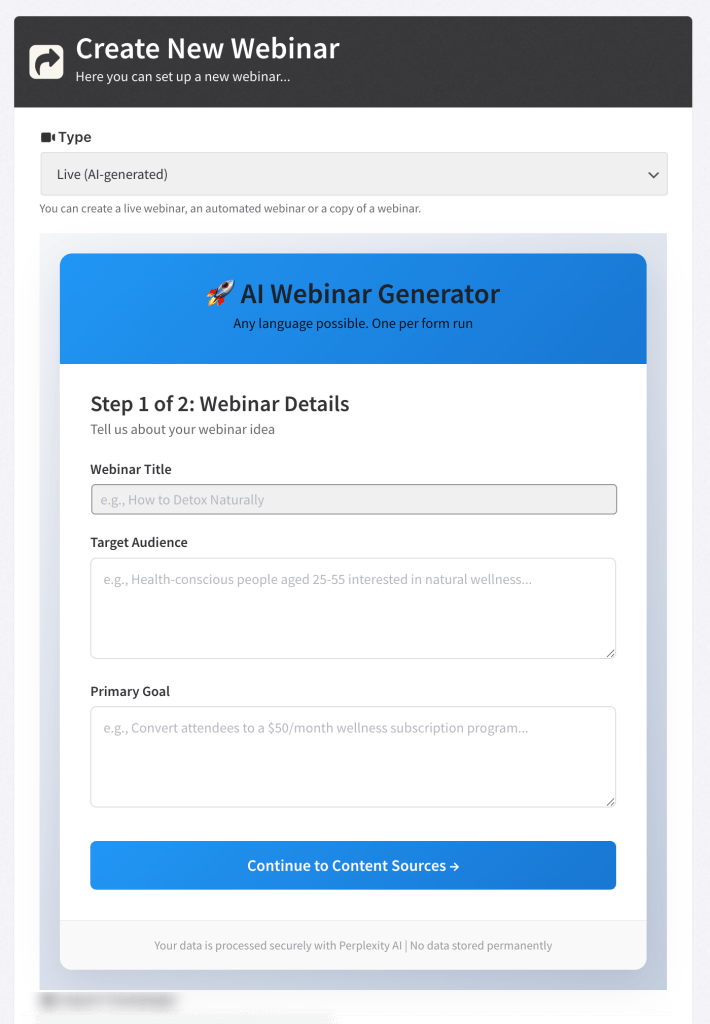


1 AI Wizard – 3 registration pages – 4 reminder emails and more.
∞Actions – Unlimited CTAs, Polls & Engagement Tools That Boost Conversions by 161%
Turn passive viewers into buyers with unlimited in-webinar actions: CTAs for upsells, polls for engagement, live chat for Q&A – all inside your WordPress webinar room.
- Unlimited CTAs anywhere, anytime: Show buy buttons, trial signups, calendar bookings, or downloads exactly when your audience is ready – not just at the end.
- Strategic polls & chat: Ask questions every 7–10 minutes to maintain attention, gather feedback, and tailor your pitch in real-time.
- No SaaS limits: Unlike Zoom Webinars (fixed features, high monthly fees), you control every action – add any WP plugin for quizzes, forms, payments, bookings, or custom CTAs.


In Zoom, attendees leave the meeting to buy or register – high drop-off risk. In WebinarIgnition, everything happens inside the webinar room: registration form, payment, trial signup, live offers – without ever leaving.
Flexibility with over 59,000+ free plug-ins
Multiple plugins for polling, scheduling, selling (WOO), booking, timer, chat (tawk.to, simple ajax chat), …
Your requirements are unique and so are the solutions like polling:
democracy poll (User can add an idea)
image poll (User can click on images)

Seamless Automation
- Web Visitors …
- Lead Magnet:
Turn visitors into leads by registering for Expert Info - Webinar Action Room:
Convert leads into customers through limited time sales promotions - Upsell FUNel:
Own the audience + details: Registered, attended & bought xyz

∞Connection via Webhooks
WebinarIgnition sends registrations, attendance status, and sales as webhooks
– including name, email, time, UTM data, and product information. This means your leads flow automatically into your email marketing tools, CRMs, automation plugins, or your own APIs
– without any extra SaaS connector layer in between. With conditions and field mapping, you control exactly which data is sent where and when.
Webhooks in WebinarIgnition how to

Read more
WordPress‑native integrations (no SaaS lock‑in)
If you want everything to stay in WordPress, tools like Groundhogg (FluentCRM alternative) can receive WebinarIgnition webhook data and handle email marketing and CRM directly on your site.
Automator plugins such as WP Webhooks or Bit Integrations do not send emails themselves – they are used to route webhook data to other plugins or external APIs when needed. AutomatorWP can receive and send data and mails.
A few examples of WordPress plugins with incoming webhooks that work perfectly with WebinarIgnition:
Webhook target (WP plugin) | Type of connection | Typical routing to |
|---|---|---|
Groundhogg (FluentCRM alternative) | Incoming webhook → create/tag contacts | Email marketing & CRM directly inside WordPress |
AutomatorWP | “Receive data from webhook” trigger | Many integrations like LMS, membership, email |
WP Webhooks | Incoming/outgoing webhooks & workflows | CRMs, email tools, other WP plugins |
Bit Integrations | Incoming webhook as trigger | Various email & CRM integrations |
Even email platforms without their own incoming webhook feature (for example Mailchimp, ActiveCampaign, HubSpot, Zoho, Brevo/Sendinblue) can be connected via AutomatorWP, WP Webhooks and Bit Integrations. You stay completely in your WordPress stack and avoid paying extra no‑code SaaS tools just to move data from A to B.
What others send vs. what WebinarIgnition sends
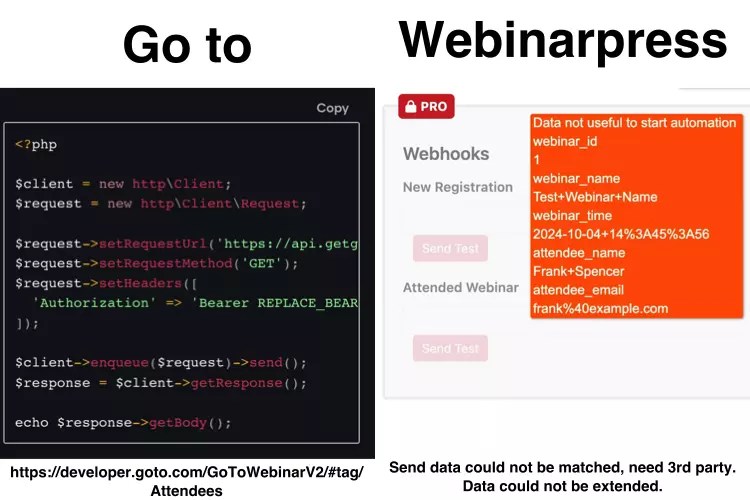
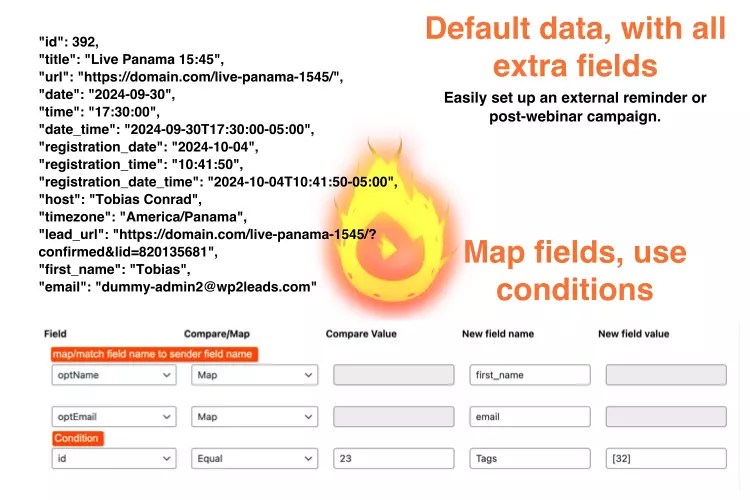
Most SaaS webinar tools only send a tiny snapshot of data in their webhooks – usually just name, email, event ID, and a simple status like “registered” or “attended”.
That’s enough for basic tags, but not for serious segmentation, revenue tracking, or behavior‑based automations.
WebinarIgnition Webhooks send full, structured webinar data: registration details, UTM tags, timestamps, attendance status, purchased products, and your own custom fields. …This gives your Groundhogg an FluentCRM alternative workflows everything they need to run advanced funnels, like ‘attended the webinar but did not buy’ follow‑ups.
Details:
Webhooks in WebinarIgnition howto
KlickTipp German Email Marketing Service has full integration for extreme automation.
Data sent comparison:
Any page design, we add webinar functionality
Your builder, your design and the webinar functionality is added by [Shortcodes].
since (Version 4.07.00+ Februar 2025)
- Add registration anywhere (footer, sidebar, popup)
- Unlimited times on the same page
- Set text, background color direct in shortcode on non Gutenberg FSE themes

Show all webinars nicely
- Multiple collections of webinars on one page (add multiple grids)
- If add archives, grid views in tabs kind of filter by language, kind possible
- Show type of webinar, webinar details, next webinar date (new)
- Show in language of the webinar
- Easy to register
- After registration:
Show registration date
Status of registration
Direct access to the webinar
The Marketing Sales Webinar Driving School
The Marketing Sales Webinar Driving School
Date: Thu, October 29, 2026
Time: 11:15 am
Language: English
Heart-Powered Content
Discover the transformative power of creating content from the heart in ‘Heart-Powered Content Creation.’ This webinar is designed for heart and soul connected people who yearn to infuse their work with genuine passion and love, moving beyond mere money-making motives. Learn practical strategies to tap into your authentic voice, craft messages that resonate deeply, and build a meaningful connection with your audience. We’ll explore how emotional authenticity fuels creativity, overcomes creative blocks, and fosters lasting impact. Through interactive exercises, real-life examples, and soulful storytelling, you’ll gain tools to align your content with your true purpose. Say goodbye to forced, transactional posts and hello to creations that light up your spirit and inspire others. Whether you’re a blogger, creator, coach, or entrepreneur, this session empowers you to create with intention, vulnerability, and joy. Join us to unlock the profound joy of passion-driven content that not only attracts but transforms. Experience the difference when your heart leads the way—register now and start creating from a place of love.
Date: To be chosen
Time: To be chosen
Language: English

Gutenberg = WP2?
In my eyes it hast the potential to be one of the fastest editors with fastest page loading. For me it is like a total integration in WP. I have to admit i tried since 2014 Oxygen, Elementor, Flatsome UX Builder, i hated GB first, then 2023 i fall in love and never stop using it. See this page.
What benefits you have with Gutenberg?
- 3 Build in registration, 1 thank you page template
- AI generated content
- Direct edit


Go Global in any Culture
Per webinar:
one language, LTR RTL,
Date & Time format.
All content already translated from pages to notifications.
Where you can use it? PS: Any language free on request.

Are you paying an arm and a leg?
With the unlimited licence, only the server is the limit. We got you covered on the server too.
We use WordPress.com hosting, which costs $25/mo paid yearly.
You have to spend at least $25/mo on hosting if you want to install a plugin like the WebinarIgnition plugin.
A unique feature of the hosting is that it allows you to handle an unlimited number of visitors, so you’re all set for high traffic during your live webinars. We have a WP.com 5 star hosting, speed and support experience.

Maximize conversion: You can either guess or use data-driven insights.
Changing just one word or image can increase conversion by up to 115.6%.
I recommended Nelio A/B Testing plugin.
I am testing the hero section of this page.
See the screenshot of Hero section test results…
Or click here to see the live results (new test from 2025.01.20).

In marketing, I have found that there is no such thing as a fixed solution, so let’s stay playful and test everything you and your team can imagine.
Reviews
“LifeWave is a breakthrough health technology company dedicated to honoring the light of life and harnessing the body’s natural energy to reverse aging and maximize human potential.”
Jaylon Vaccaro
“Designed for optimal digital communication, Jupiter’s specialized services encourage meaningful engagement, setting the stage for enhanced interactions and effective connections.”
Jaylon Vaccaro
“Two money coaches and financial advisors with a wealth of published works. Our mission is to empower women to achieve their financial goals through education in financial literacy, investing and career development.”
Jaylon Vaccaro
“We are passionate about empowering women on their wellness journey and helping them manage hypothyroidism (underactive thyroid) by uncovering the true underlying causes responsible for their condition.”
Jaylon Vaccaro
Affordable Plugin with Amazing Customer Service

chrsctlg May 15, 2024
I recently had the pleasure of using Webinar Ignition, a fantastic WordPress webinar plugin. The plugin is robust and user-friendly, and the customer service experience was exceptional. Ehtisham, the customer support staff member who assisted me, was courteous, patient, and incredibly resourceful.
He didn’t give up until he found a solution that worked perfectly for my needs. Finding such dedicated support is rare, and it made a significant difference in my experience. I highly recommend both the plugin and their top-notch customer service!.
Five Star Plugin & Support

Lee Juan May 18, 2024
Hi Ehtisham, Tobias, and the Webinar Ignition Team, I have received the plugin, and I am so grateful for it. Thank you so much for your support. I really like Webinar Ignition. It has the most complete set of features for webinars, even compared to more expensive platforms. It really helps me teach our community through live and evergreen webinars.
Additionally, I appreciate the ability to customize the registration forms and pages. Your support has been very helpful—five-star support for you guys! Ehtisham, your customer support has been especially noteworthy. Once again, thank you for trusting me. I look forward to staying connected with you. Highly recommended
More WP.org reviews
Ehtisham worked with me to help me figure out how to set up the zoom webinar on Webinar Ignition and clarified all my doubts as well. Appreciate his assistance in setting it up.

Best Evergreen webinar plugin
smartcareers February 18, 2024
Webinar Ignition stands out as an economical yet effective webinar solution. With its affordability and dedicated support, it’s the ideal choice for maximizing webinar impact without exceeding your budget.
Whenever I needed help Mr Ihtasham Ul Haq always helped me resolving the issues. Experience the brilliance of Webinar Ignition today. Highly Recommended.

This is the next generation of webinar functionality
ninasource October 13, 2023
I started using Webinar Ignition in 2017 – as a user and value-added reseller. It was a great platform for the time, but with no further development done, it fell behind the industry standard. Now we’re in the era of Webinar Ignition 2.0 so to speak and since Tobias and his team acquired the business, it has undergone so much innovative development on the back end. What we have now is a world class webinar product, fully integrated into the world’s most popular CMS – WordPress.
What you get is a fully customisable experience, unlimited webinars and options. You can run the webinars using the templates or integrate functionality into your own pages using short codes. If anything, there is almost too many options available and this can be bit much when learning the new system. Ehtisham from the web dev team has provided so much direct support to resolve questions and queries, and to get my first evergreen webinar funnels set up.
So, what can you expect from this plugin – a global team of dynamic people who are passionate about their product and who really know their product and who will always go out of their way to help. A world-class webinar platform to rival any of the big brand names at a sweet price that is accessible to everyone’s pocket. A system that is developing all of the time, an innovative leadership and people like Ehtisham, who go above and beyond every time. 100% recommended.
WebinarIgnition Pricing
Plans
Launch in 30 minutes with AI.
Included in all Unlimited ∞ plans:
Never worry about limits again.
∞ registrations
∞ webinar time
∞ attendees
∞ webinars
∞ extendable with WordPress plugins
∞ in‑webinar interactions
Unlimited
For solo creators who never want to hit limits.
$49
monthly
- ∞ registrations, so no one is left outside your webinars.
- ∞ webinar time, stay live as long as your audience is hot.
- ∞ interaction (CTAs) inside your webinar. WordPress content only like polls, bookings and forms. Keep viewers engaged so they stay and interact.
- Webhooks send data anywhere, connect smoothly with your favourite tools.
- Paid webinars, charge for access and get paid for your expertise.
- 1:1 Consultant Tech Support, get expert guidance on your setup and funnels when it really matters.
Plus
For growing teams who want more sales from every webinar.
$99
monthly
- Show webinars in grid views, so visitors quickly find the right live or evergreen offer.
- Meet & stream with 100ms, a clean, focused live platform so you can sell without distractions.
- Interactions (CTAs) on external pages, display external checkouts, registration or appointment pages as live CTAs in your webinar.
- Show WooCommerce checkout, upsell funnels as CTA inside your webinar, so participants can buy without leaving the webinar.
- 1:1 technical done‑for‑you, we take care of the setup for you, so your webinars just work.
- Single user only
Stops access sharing
“Not sure yet? → Save 1 month free — only inside the the webinar
Plus VIP
$199
monthly
- 1:1 VIP technical support, direct line to the expert when it really matters.
- VIP meetings, plan funnels and launches together with a pro.
- Groundhogg Pro 1 site license included, plug into a proven email automation engine.

See the CEO live in Webinar
Unlimited
“Have all leads saved“
💰💰 Best value 💰💰
Unlimited Plus
“Interact and sell most”
We Setup, so you can focus on your audience:
- Connect to E-Mail Marketing
- SMTP setup
- Convert video source
- Registration page design, layout
- Setup Streaming provider
- Unlimited user hosting
- Caching …
Unlimited Plus VIP
“Every detail is perfectly tightened.”
Ultimate
All live and evergreen features
Prices excluding VAT | Subscription licenses let you use the plugin for as long as your plan is active. Lifetime licenses give you unlimited use—no renewal needed! | Seamless 100ms integration to Meet 300+ & Stream 10.000+ participant (10.000 minutes/mo included, then $0.004/min and participant.) | Any payment made for your current monthly or yearly period will be automatically credited towards your upgrade at checkout when you enter your license key. Enjoy a seamless, one-click upgrade directly inside the plugin. One license per site needed. On multi site each sub site needs a license
Are you proprietary or open source?
“You can easily change hardware like a phone, but you change software less often, e.g. from iOS to Android or from Microsoft Windows to Apple MAC OS”
Topics | SAAS* like ZOOM Webinars | WordPress Plugin WebinarIgnition |
|---|---|---|
APPs | ||
Compatibility with existing plugin, theme and WordPress | ✔️ Run seperated | ✔️ From Version 3.9+ compatible |
Maintain website speed | ✔️ Run separately | ✔️ Load only what is necessary and this asyncron |
Integration into own design | 〇 Fixed design on a separate site | ✔️ Complete integration |
Can be extended by yourself | 〇 Fixed functions, APPs | ✔️ Fully extensible |
Can be extended by developer | 〇 No. Closed code | ✔️ Open-source (see & fork) |
Features changeable like other chat, poll | 〇 No. | ✔️ Complete flexibility (see) |
Community that grow code, security, usability | 〇 No. | |
Security updates, new features when ready | 〇 No. | ✔️ Each plugin update individual |
Best solution, you want other chat, connection? | 〇 No. Only build in solution. | ✔️ Sure, replace what fit best for you. |
Get an expert solution, support for plugins used | 〇 No. Workers do mainly all. | ✔️ Most plugin developer are field experts. |
For the highest conversions do A/B testing | 〇 No. May some parts can be tested. | ✔️ Test ∞ registration pages, each page content |
Summary: From my point of view: A software that is flexible and extentdable wins, because since 2014 I choose WordPress, WooCommerce, WebinarIgnition 2021 and then I fine tune by changing small parts like design, add some form fields and keep the main setup. Yes, I have the same WooCommerce shop since 2014 and it is up and running.
About Us
- Tobias CEO & Reviewer & Innovator & Investor
Since 2005 self employed
Since 2010 Online Business, Woocommerce Shop
Since 2014 WordPress Automation plugins
Since 2022 bought WebinarIgnition - Family: Mom, Dad (†), Brother (together Backbone, Financing)
- Support in live webinars, quick start videos, tickets, appointments
- Arman (Manager) and Team (Development)
Talha (Senior) and Faheem (Design magic),
M-Ali (Design frontend and backend, Gutenberg specialist),
Fahad (QA) - YOU (Ideas, Financing, Webinar Success), lets meet live
- WhatsApp Mastermind (Q&A, Ideas, Voting)

Milestones
- 2013 Mark created WI (WebinarIgnition)
- Sold to other owner
- 2022 Tobias bought WI
- Since 2022 new added:
- Any language,
- Shortcodes to add webinar functions inside your page builder.
- WooCommerce paid webinars.
- Anything as CTA inside the webinar
- Webhooks+ to sent anything anywhere
- Read-only autofill of registration data
- Expert support
- …
- 2024 May – Sept. Code Redo
- Back on wp.org
- New webinarignition.com website with only true and practical information
- E-mail onboarding deluxe with nice content from website+ and “Next todo” section
- Since Version 4.04.0 (August 2025)
Live webinar 100ms infrastructure details
– in-webinar admin bar to trigger CTAs
– Unlimited interactions
WP Plugins and external sources
– Recurring live webinars
– Import/export leads - Since September 2025 weekly Q&A webinars with 100% tech setup guarantee
- Since Version 4.07.00 (2026.01.04) beta details
– Gutenberg registration pages (direct edit)
Default or with AI generated personal content
– GB thank you page (4.07.39+)
– Registration shortcodes (details):
Anywhere(footer, sidebar, popup)
unlimited times
– Webinar Grid details
multiple times on the same page
new design, time zone support
Roadmap
WI Phoenix V4.09+: A highly integrated WP webinar plugin based on Gutenberg
(Still works in other builders)
Goal as easy as WP to use, to design, to extend.
- Webinar room in Gutenberg
- Thx, registration pages have all text content to direct edit. (currently in Shortcodes and extra settings)
- Move settings to the Gutenberg page
- Do WebinarIgnition Gutenberg blocks (For non Gutenberg webinar with shortcodes in extra field)
- Global mails to create a automated webinar funnel:
webinar 1 product bought(goal completed like booked an appointment),
then send mails for the 2. webinar, …
Case not attended, not bought… - Global leads for easy import to a funnel step, export to nurture further in own CRM, email marketing
Generally as we 2022 have implemented subscription model for a sustainable income, we are happy and serious to bring the best WP Webinar experience to set up and for your clients.
Sure goal is a win-win situation.
You get many times more out of what you pay for the licence and we have revenue to develop and live.
Frequently Asked Questions
Any questions that haven’t been answered?
Plugin with human support
Contact Us

4.9 rating out of 5.0 rated for support
Live chat and technical support for all users & customers
Customer support with a personal touch
